This prompt turns one phone photo of your product into the hero picture: the product large in the frame, standing on a surface that suits it, in one clear light. It is the picture for the top of a product page, the first slide of a post or the email you send a stockist.
You need a sharp photo taken straight on in daylight, with the label square to the camera. Fill every blank, attach the photo and paste. It works in in Google AI Studio, where Google's pricing page lists it as testable on the free tier, in the Gemini app under Create images in the tools menu, and in ChatGPT.
The line that quotes the label word for word does more for accuracy than any other line. Google's own prompting guide says the same: put the words you need in quotation marks. When we ran it on an invented face oil, the label came back letter for letter and only the room changed.
The prompts
01The promptText The attached photo shows my product. Keep the product exactly as it is in the photo: the same shape and proportions, the same [MATERIAL AND COLOUR], the same cap or closure, and the label with every word spelled, sized and placed as it is. The label reads, line by line: "[LABEL TEXT, LINE BY LINE]". Do not redraw, restyle, straighten or tidy the packaging. Only the scene around it is new. Make one hero photograph of this [PRODUCT] in a [ASPECT RATIO] frame. It stands on [SURFACE], seen straight on with the camera level with the middle of the label, and it fills most of the frame, with a little space above the cap and to either side. Shot on a Canon EOS R5 with a 100mm macro lens at f/8, so the whole product is sharp and the wall behind falls softly out of focus. One light source: [LIGHT], coming from the left, giving a soft shadow to the right and one clean highlight running down the side of the product. The product sits on the surface with a real contact shadow. Colours are true to the photo and the white balance is neutral, with no yellow cast. The background and surface stay quiet and pick up [BRAND COLOURS] without competing with the product. Leave one small real imperfection, such as a faint fingerprint on the glass or a grain of dust on the surface, so it reads as a photograph. Do not add any other product, prop, text, logo, sticker or price tag. No pedestal or podium, no floating, no glowing halo or gradient backdrop, no plastic or CGI look, no over-sharpened or HDR finish.Attach one straight-on photo of the product first, then paste. Separate the lines of the label with a slash.
02As we ran it, for an invented face oilText The attached photo shows my product. Keep the product exactly as it is in the photo: the same shape and proportions, the same amber glass with a black rubber bulb and black collar, the same cap or closure, and the label with every word spelled, sized and placed as it is. The label reads, line by line: "FACE / OIL / No. 4 / 30 ml". Do not redraw, restyle, straighten or tidy the packaging. Only the scene around it is new. Make one hero photograph of this 30 ml face oil dropper bottle in a 4:5 vertical frame. It stands on a slab of pale honed travertine, seen straight on with the camera level with the middle of the label, and it fills most of the frame, with a little space above the cap and to either side. Shot on a Canon EOS R5 with a 100mm macro lens at f/8, so the whole product is sharp and the wall behind falls softly out of focus. One light source: soft morning daylight from a tall window, coming from the left, giving a soft shadow to the right and one clean highlight running down the side of the product. The product sits on the surface with a real contact shadow. Colours are true to the photo and the white balance is neutral, with no yellow cast. The background and surface stay quiet and pick up warm sand and muted sage green without competing with the product. Leave one small real imperfection, such as a faint fingerprint on the glass or a grain of dust on the surface, so it reads as a photograph. Do not add any other product, prop, text, logo, sticker or price tag. No pedestal or podium, no floating, no glowing halo or gradient backdrop, no plastic or CGI look, no over-sharpened or HDR finish.Run once in Nano Banana Pro at 2K with one phone photo attached. The label, dropper and glass came back unchanged.
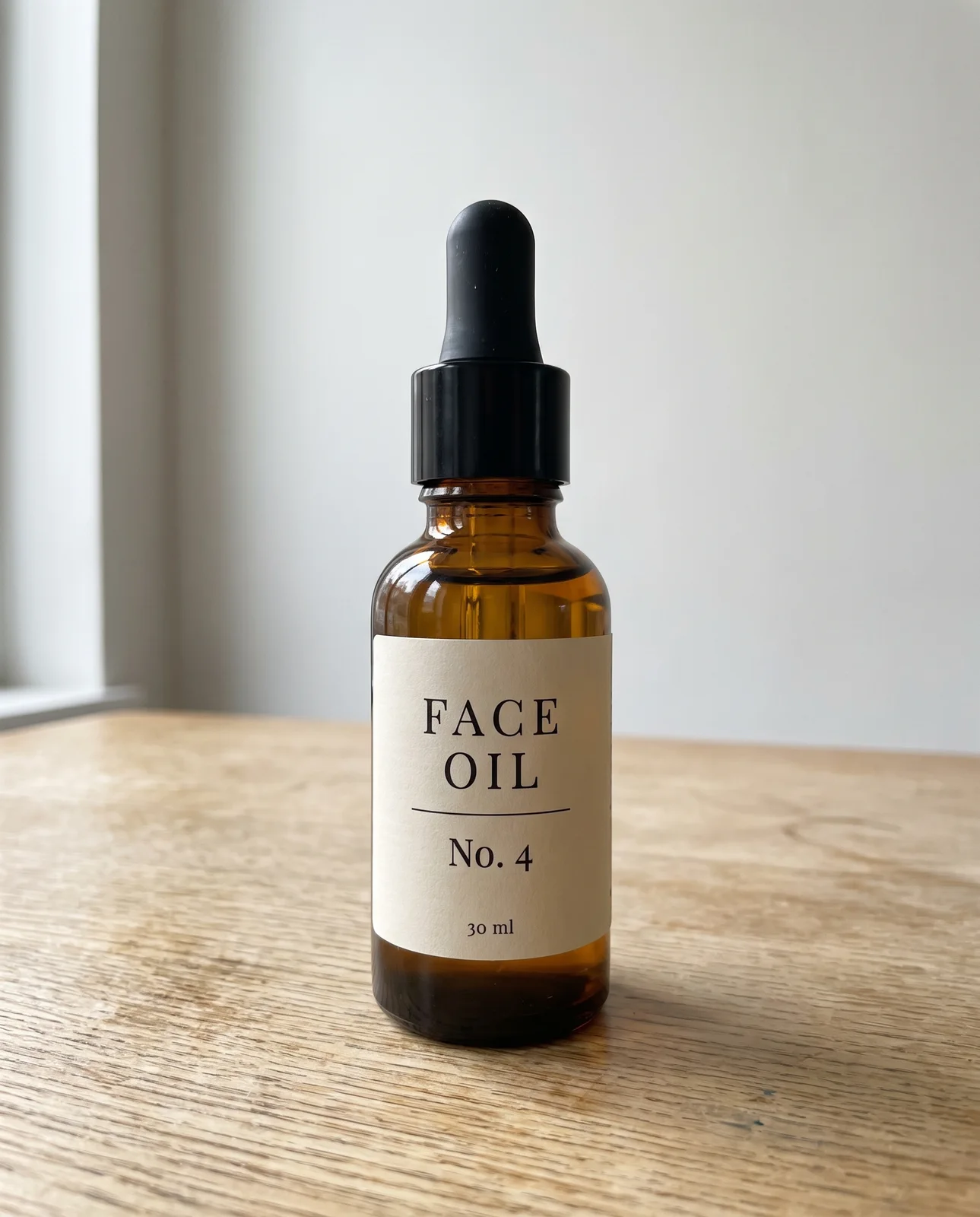
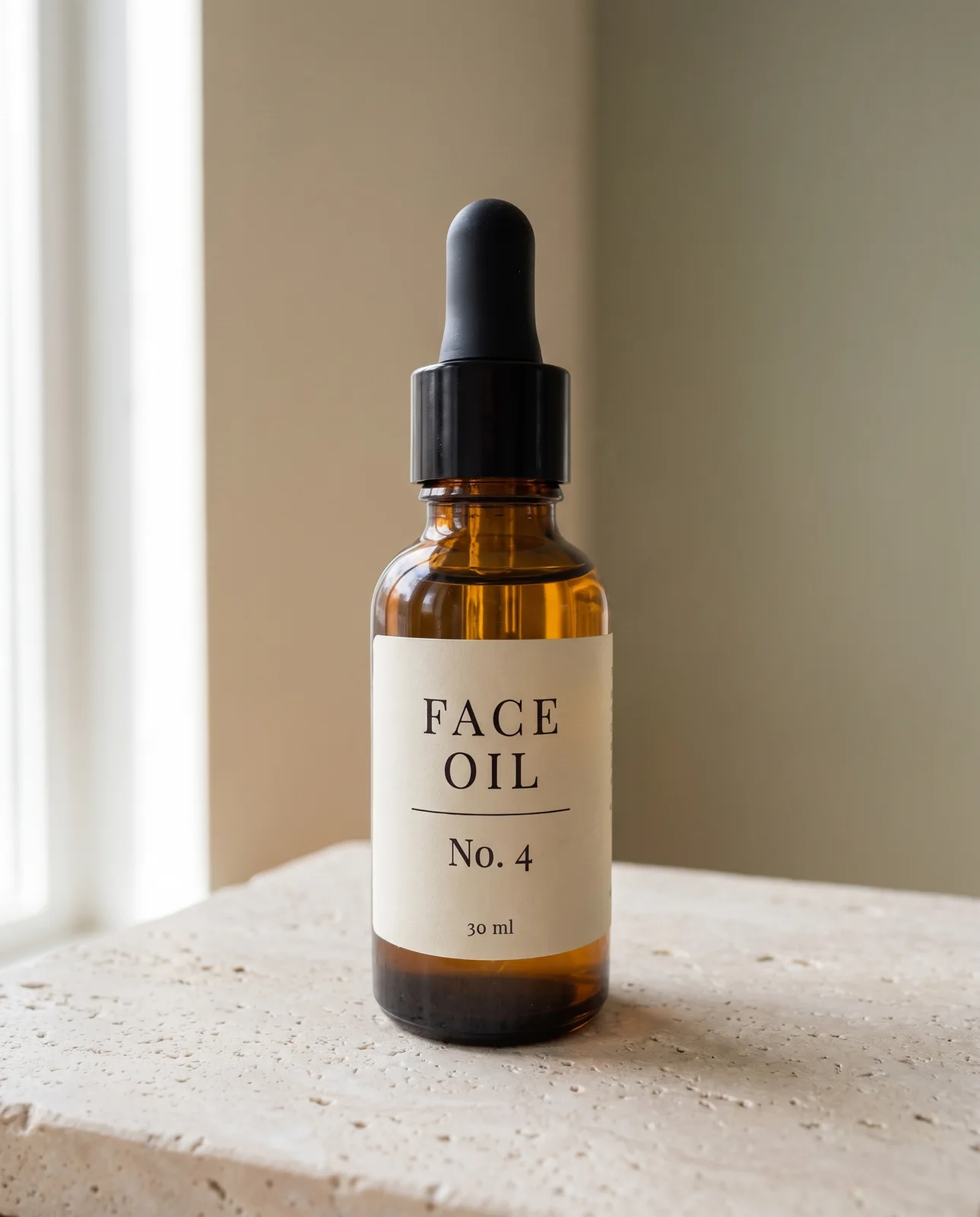
Checklist
Check this before you use the picture
- Read the label letter by letter against your own photo, at full size.Models redraw text that looks right at a glance. A swapped letter, a dropped line or a changed number is the most common failure and the one customers notice.
- Lay the outline of the product over the original: height against width, the shoulder, the cap.A bottle that has grown taller or slimmer is no longer your bottle, even with the right label.
- Find the dark line where the base meets the surface.No contact shadow means the product is floating, and the eye reads it as a cut-out.
- Check that the light tells one story: the highlight on the side the light comes from, the shadow on the other.Two shadows, or a highlight on the wrong side, is how a pasted product gives itself away.
- Hold the real product next to the screen in daylight and compare the colour.Models tend to warm a scene. An amber that has turned orange or a white that has turned cream is a complaint waiting to happen.
- Look for anything you did not ask for: stray text, a second product in a reflection, a prop at the edge.The model fills empty space by habit. Anything extra is cropped or regenerated before the picture goes out.
What to do it with
- Google AI StudioFree tier, paid above it
Where Gemini API keys, projects, billing and spend caps are made, with a playground for the models.
Bad at Free-tier prompts are used to improve Google's products, and the billing screens changed several times in 2026.
- GeminiFree tier, paid above it
Google's assistant, with a very long context window and tight links to their other products.
Bad at Behaviour changes between the app, the API and the versions inside other Google products.
- GPT ImagePay per use
Generates and edits images with unusually good instruction-following, and can hold text inside a picture better than most.
Bad at Faces drift between generations unless you feed a reference every time. Skin can come out plasticky at default settings, and a heavy fidelity setting costs many times more and takes many times longer.
The words, in plain language
- Reference photo
- The photo you attach. The model copies the product from it and invents everything else, so a blurred or tilted photo leaves it less to copy.
- Contact shadow
- The thin dark line where an object meets the surface under it. Without one, a product looks pasted in.
- Nano Banana Pro
- Google's name for its Gemini 3 Pro Image model. The Gemini app makes pictures with Nano Banana 2, and paid Google AI plans can remake a result with Pro from the three-dot menu (Redo with Pro).
Why it matters
The judgement left to you is the surface and the light. Choose them from where the product lives, not from what looks expensive: a face oil on bathroom stone, a spice tin on a steel kitchen counter. A marble slab under a jar of pickle is a mismatch a customer feels without being able to name it.
- Type
- technique
- Period
- ongoing