of animation are a list of what makes drawn movement look alive. Animators at the Walt Disney studio worked them out from the 1930s onwards, and two of them, Frank Thomas and Ollie Johnston, wrote them down in The Illusion of Life: Disney Animation, published in 1981. Both men were among the studio's Nine Old Men, the core animators of its classic features. The book is still a standard reference. The principles were written for characters on a cinema screen, watched by an audience that had chosen to watch. Anybody who moves things on a screen today borrows from them, and the skill is knowing which ones travel.
Here they are in the book's order. deforms a shape to show weight and impact, the way a ball flattens when it lands, while its volume stays the same. is the small move before the big one, a crouch before a jump. presents one idea at a time so the viewer knows where to look. Straight ahead action and pose to pose are two ways of drawing a move, either frame by frame from the start or key poses first with the frames between them filled in afterwards. and overlapping action let parts keep moving after the body stops, like hair or the tail of a coat. means things speed up and slow down instead of starting and stopping at full speed. Arcs say natural movement travels in curves. Secondary action adds a smaller movement that supports the main one. Timing is the number of frames a move takes, which decides how heavy or quick it feels. Exaggeration pushes movement past realism so that it reads. Solid drawing keeps forms three-dimensional, with weight and volume. is what makes a character worth watching.
About half of them transfer directly to interfaces and brand motion. Slow in and slow out is the one you will use every day, because it is what an easing curve does. Timing becomes a duration in milliseconds. Staging becomes the rule that a transition should draw the eye to the single thing that changed, rather than animating six elements at once. Anticipation and follow through are what make motion feel physical, so a panel that compresses a fraction before sliding out, or a list that settles a few pixels after arriving, reads as an object with mass. Arcs and secondary action turn up more in brand films than in product screens. Squash and stretch, exaggeration and appeal are the ones to hold back, because at interface scale they read as childish very quickly. Solid drawing and the two drawing methods belong mostly to character animators.
The big interface systems have written these ideas into rules. Google's Material Design gives developers named easing curves, a standard set and an emphasised set, each with one version for things entering the screen and another for things leaving it. It pairs them with sixteen duration steps between 50 and 1,000 milliseconds, and says that duration should grow as the area or distance of an animation grows. That is slow in and slow out, and timing, turned into tokens a developer can reach for. Apple's guidelines lean the other way. The Human Interface Guidelines tell designers not to add motion for the sake of adding motion, to make it optional, to let people cancel it, and to avoid animating interactions that happen often. Read together, the two documents give you the working position. Use the principles to make movement legible, and use as little movement as the job allows.
Brand motion can take more of them. It is met less often than an interface and watched rather than used, so it can carry more character before it wears thin. When Google redrew its identity in 2015, it added four coloured dots that animate to show the assistant listening, thinking, replying, incomprehension and confirmation. Those dots borrow squash and stretch, anticipation and appeal openly, which suits a character people talk to and would be wrong on a settings screen. Interfaces use the same principles more quietly. Apple's Genie effect, which pours a minimised window into the Dock and has been part of Mac OS X since 2001, is squash and stretch put to work, because the window distorts as it travels and you can see exactly where it went. There the stretch is carrying information.
On a real job the principles work as a checklist, one moment at a time. Take a product card that opens into a detail view in a shopping app. Timing sets the length first. A few hundred milliseconds is usually right, and slow in and slow out picks the curve, quick off the tap and settling at the end. Staging decides that the card itself grows while everything around it fades, so the eye follows one object. Follow through lets the photograph inside the card land a beat after its frame. Anticipation is usually cut here, because somebody who has just tapped a card wants the response at once, and a wind-up before it, however small, feels like the app hesitating. That is four principles in one transition, and nobody using the app could name any of them.
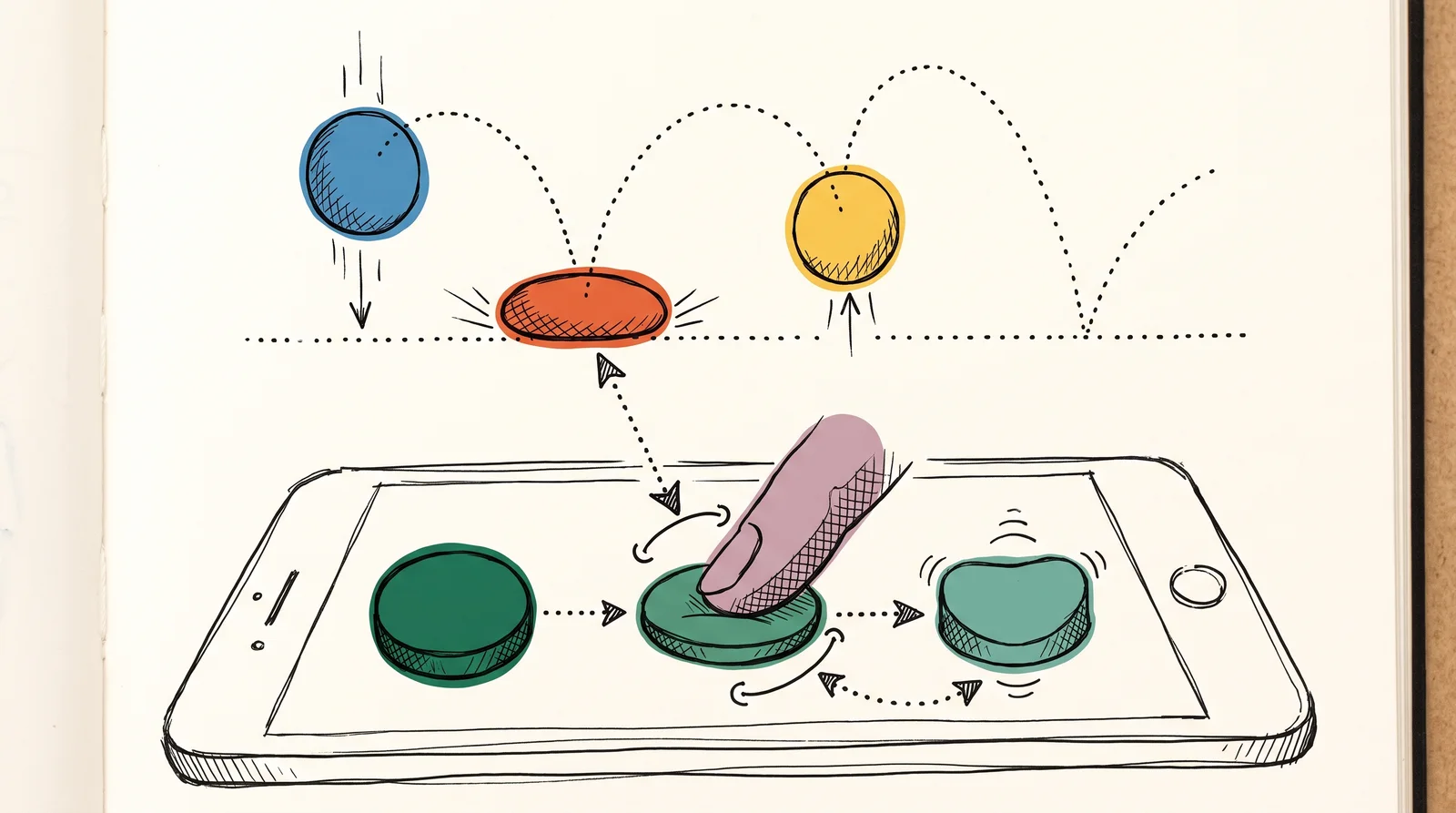
Try this
Animate a ball, then a button, with the same principles
In any tool that animates (After Effects, Figma's Smart Animate, Keynote's Magic Move or a few lines of CSS), make a ball drop from the top of the frame and bounce twice before it settles. Squash it on each landing and stretch it as it falls. Then animate a single button being pressed and released, using the same principles at a far smaller size. Watch both at full speed, then at a quarter of the speed.
Time: One hour. You need: Any tool that animates, or a browser and a text editor, a phone, to watch the button at its real size.
Look for
- The ball speeds up as it falls and slows near the top of each bounce. If it moves at one speed throughout, the spacing is linear.
- Each bounce is lower and quicker than the one before. Equal bounces read as a machine.
- The squashed ball keeps its volume, getting wider as it gets shorter. A ball that only shrinks looks as if it is deflating.
- The button responds within the first few frames of the press. A wind-up before the response feels like lag.
- How little squash the button can take before it looks like a toy. It is a fraction of what the ball needed.
- Whether you can still tell what happened with the motion switched off. If you cannot, the animation was carrying information that needs another route.
The words, in plain language
- The twelve principles
- Disney's animation principles, set out by Frank Thomas and Ollie Johnston in 1981.
- Squash and stretch
- Deforming a shape to show weight and impact while its volume stays the same. Usually far too much for an interface.
- Anticipation
- A small preparatory move before the main one. Makes an action readable.
- Staging
- Presenting one idea at a time, so the viewer knows where to look.
- Follow through
- Parts continuing after the main movement stops.
- Slow in and slow out
- Speeding up from rest and slowing into a stop. What an easing curve does on a screen.
- Appeal
- The quality that makes a character worth watching. Hold it back on a screen people use all day.
Why it matters
Without the principles, motion defaults to whatever the tool does, and in many tools, After Effects among them, keyframes move in a straight line at an even speed unless somebody changes them. Linear movement starts at full speed and stops dead, which no physical object does, so the interface reads as a machine even when every other detail is careful. Things appear from nowhere. Six elements move at once because nobody decided which one mattered, and the user has to work out for themselves what changed. None of this is a disaster on its own, but together it makes a product feel cheaper than it is.
The opposite failure is using all twelve. They were developed for characters on a cinema screen with a viewer who has chosen to watch, and an interface element is met hundreds of times by somebody trying to do something else. The correct amount of personality in a button is much less than it is in a bouncing ball. Motion also has a physical cost for some people, which is why phones and browsers offer a reduced-motion setting, covered in "Restraint in interface motion". Apple's guidelines add that motion should never be the only way important information is communicated.
Designers disagree about how far to take the book. One camp treats the principles as the foundation of all good motion and wants every interface to feel as physical as a drawn character. The other says they belong to cartoons, and that interface motion has only two jobs, showing where things came from and confirming that an action registered. Both are partly right. The principles are the best vocabulary anyone has written for describing movement, and learning them is how you come to see why one transition feels expensive and another cheap. On a screen, using them well mostly means using fewer of them, at a smaller size, and only where they explain something.
The module goes deeper from here. It starts with timing and spacing, the difference between how long a move takes and where the object is at each moment, then turns that into easing curves and springs. It covers transitions that keep a user oriented, restraint and the reduced-motion setting, and how a brand writes its motion down as a small set of named durations and curves. It also looks at type that moves, at sound and picture cut together, and at the storyboards and animatics that settle timing before anything is animated.
Elsewhere
- Type
- term
- Period
- ongoing